Can’t find your answer?
Contact us!
Help · FAQ
Frequently asked questions
Tracer Golf runs self-serve indoor golf simulators across the GTA, open 24/7. Book a bay in the app, unlock the door with your phone, and start hitting. Answers to the most common questions are below.
Booking
How do I book a bay?
Book in the Tracer Golf app (iPhone and Android) or on a computer at book.tracergolf.ca.
First time? Create an account and set a password. We email you a verification code, so check your spam folder if it doesn't arrive.
Is the price per bay or per person?
Per bay. Up to 4 people can share a bay at no extra charge.
How many people can use one bay?
Up to 4 people per bay.
How far in advance can I book?
Up to 30 days ahead.
Can I book last minute?
Yes. If a bay is open, you can book it, even minutes before you arrive.
Is there a minimum booking time?
You can book as little as 15 minutes. It's a handy warm-up before heading to a course with no range.
Can I extend my session?
Yes, as long as the next slot is open. Use Extend My Booking in the app, or make a new booking. The simulator won't shut down or reset your data.
The schedule shows an open slot, but I can't book it. Why?
The calendar doesn't update in real time. On your phone, pull down to refresh. On a computer, refresh the page (F5).
Do my guests need to register?
Yes. Everyone who didn't make the booking must complete the guest registration form before entering any Tracer Golf location.
Are kids welcome?
Yes, kids are welcome.
Can other people see my booking?
No. Your name never appears on a public schedule.
Can I change the email address on my account?
Not at the moment. You'll need to create a new account with the new email address.
Pricing & payment
How much does it cost?
From $18/hr and even less in the summer. You pay per bay, per hour, and up to 4 people can share a bay. Rates vary by season, location and bay type (Regular, Premium or Pro). See Rates & Locations for current prices.
Do you offer memberships or packages?
No. There are no memberships, packages or commitments. You pay for each session when you book.
When do I pay?
When you book.
What payment methods do you accept?
Visa, Mastercard and American Express. You can also use a Tracer Golf eGift Card.
Is my credit card information safe?
Yes. Card details go straight to our payment processor, Stripe, and never pass through our servers. Stripe is a Level 1 PCI Service Provider (the highest security standard in card payments), and all card numbers are encrypted.
Why does my credit card statement say "Tracer Golf North York"?
Our head office is in North York. Some banks add that city name to the charge. It has nothing to do with the location you booked.
I'm getting the error "your postal code is incomplete".
When you enter your card details, there's a postal code field just to the right of the CVV. Fill that in and try again.
How do I update my credit card?
In the Tracer Golf app, go to Account → Manage Payment Info to add or remove a card.
Changes, cancellations & refunds
Can I reschedule or cancel a booking?
Yes, up to 3 hours before your start time. In the app, open Booking Details → More Options.
Read the full cancellation policy · Learn: how to cancel or reschedule
Do you give refunds?
Yes. If you cancel within the cancellation window, you get a full refund. If a simulator fault cuts your session short, contact us and we'll make it right.
Getting in
How do I get into the facility?
Use the Smart Door Key in the Tracer Golf app. It works from 15 minutes before your start time until 15 minutes after your end time. You need a booking to enter.
What are your hours?
We're open 24 hours a day, 365 days a year.
When is support available?
Technical support is available every day from 8 a.m. to 9 p.m. In your bay, use the intercom/phone beside the monitor. For general questions, call 647-812-8240 to reach Sara, our virtual information agent.
The Smart Door Key didn't open the door. What do I do?
Wait 10 seconds and try again.
I don't have a data plan. Can I still get in?
Yes. Connect to our free Wi-Fi first (the network name and password are posted at the door), then open the Smart Door Key in the app.
Can I step outside during my session?
Yes. You can leave and come back as often as you like during your booking. Just bring your phone, because you need the Smart Door Key to get back in.
I left something behind. Can I go back in?
You have 15 minutes after your session ends. After that, book another session or contact us during support hours.
Do you have a lost and found?
Yes. Items we find are kept at the back of each facility. Let us know when you plan to come by and we'll open the door for you.
Locations & facility rules
Where are your locations?
We have self-serve locations across the GTA:
- Toronto North: 150 Lesmill Rd (401 & Leslie)
- Toronto West: 501 Alliance Ave
- Beaches: 2120 Queen St E (Queen & Hammersmith)
- Scarborough: 1225 Kennedy Rd, Unit C
- Mississauga: 5980 McLaughlin Rd, Unit 2A
- Oakville: 212 Wyecroft Rd, Units 21 & 22
- Pickering: 1698 Bayly St, Unit 5
- Whitby: 340 Taunton Rd E, Unit B4
- Newmarket: 16655 Yonge St, Unit 5
See Rates & Locations for maps, bay layouts and prices.
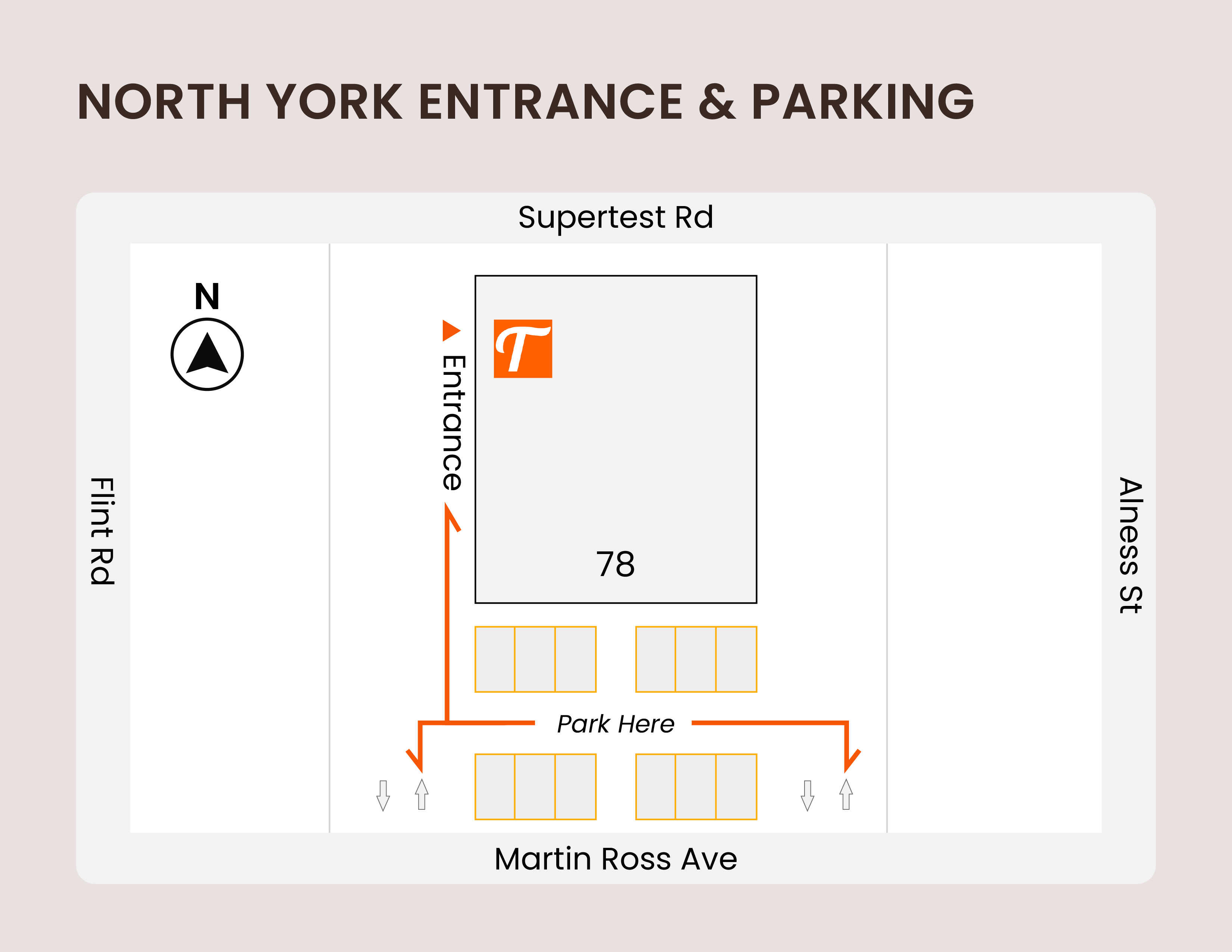
Where is the entrance at North York (78 Martin Ross Ave)?
On the left side of the building, down the alley, near the back.
Can I wear golf shoes?
Yes, if they're clean and won't damage the mats. Metal spikes are not allowed.
Can I bring food and drinks?
Light food and non-alcoholic drinks are fine. Alcohol is not allowed. Please leave the bay as clean as you found it.
Can I bring my pet?
Sorry, pets aren't allowed at any Tracer Golf location, even small or hypoallergenic ones.
Is there Wi-Fi?
Yes, free Wi-Fi at every location. The network name and password are posted at the door and in each bay.
Can I request a location near me?
Yes, please do. Tell us where you'd like a Tracer Golf on our expansion page. Requests help us decide where to open next.
Bays, simulators & courses
What simulators do you use?
Regular and Premium bays use Impact Vision. Pro bays use TrackMan iO.
Can I play real golf courses?
Yes, at no extra charge. Impact Vision has over 50 courses and TrackMan has over 250.
How long does it take to play 18 holes?
Budget 45 minutes to an hour per person. To speed things up:
- Have the next player ready while the current player hits.
- Increase the putting concede distance.
- Take fewer practice swings.
- Play from a shorter tee box.
Do you provide clubs?
No. Please bring your own clubs.
Do you provide balls and tees?
Yes. Every bay has premium range balls and rubber tees in 3 heights. You're welcome to use your own balls, but please no Sharpie marks, because they damage the screen.
Do you have bays for left-handed players?
Yes. Most bays work for both left- and right-handed players, and each location page shows which bays are which. In the software, select Left in the driving range and again before you start a game.
Can I save my swing videos or export my shot data?
Not at the moment. You can view a summary of your shots in the driving range, and we've asked the manufacturer to add an export option.
Do you have tutorial videos?
Yes. Watch our quick-start tutorials before your first visit to get more time hitting balls.
During your session: quick fixes
The sensor isn't reading my shots. What should I check?
Check these three things first:
- Ball placement: place the ball inside the hitting zone shown on the sign under the monitor. If shots off the mat aren't reading, try about 6 inches left or right of the tee.

- Club selection: select Driver to hit off the tee, or any other club to hit off the mat.

- Hand setting: make sure left- or right-handed is set correctly.

Still not working? Restart the computer, or use the intercom beside the monitor during support hours (8 a.m. – 9 p.m.). If the sensor is faulty, book another bay if one is free and contact us for a refund.
TrackMan is misreading my shots. Any tips?
The three most common causes are:
- Waggle: set the club behind the ball and pause before you swing. The longer the pause, the better. TrackMan iO's camera light switches on with club movement and times out after a few seconds, so a long waggle can make it miss your swing.
- Ball colour: use white balls only.
- Club head colour: white club heads can cause misreads.
The computer is frozen.
Press Alt + F4 and restart the computer. For on-and-off problems, exit the software and reboot.
The monitor is off.
Turn the monitor's power button on and wait a few seconds. If it's still black, contact us and we'll get it fixed.
How do I turn on the swing cameras and replay my swing (Premium bays)?
Open the Menu and turn on Swing Vision. After each shot, click the video icon in the bottom-right corner of the screen to replay it. Use the Left/Right button on the switcher at the bay computer so the cameras match your stance.
How do I change the tee box?
You can change the tee box from the game settings menu.
How do I reset the simulator to default settings?
Exit the game or range and keep clicking Back until you reach the logo screen. That resets everything to default.
There are no balls or tees in my bay.
Sorry about that. We restock regularly, but sometimes players move them between bays. Ask a neighbouring bay for a spare, or use your own balls. Thanks to the ball return, 1 or 2 balls is usually enough.
The app isn't working.
Try these in order: update the app, reinstall it, or book in a web browser at book.tracergolf.ca. Make sure you're logged in. Still stuck? Contact us and we'll help.
eGift cards
Do you sell gift cards?
How do I use an eGift Card?
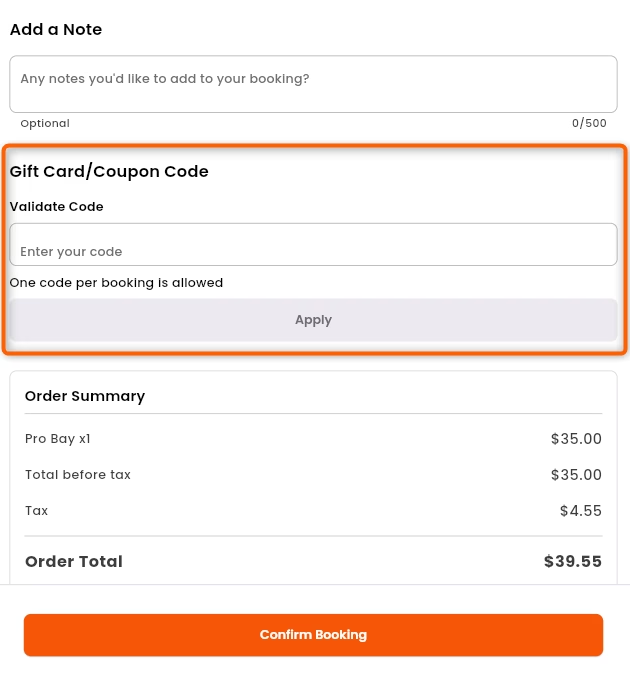
Enter the code at checkout when you book in the Tracer Golf app.